Case lifecycle and control
Move incidents from open through containment, eradication, recovery, and governed closure. Track severity, classification, TLP, PAP, confidence, command, source identity, affected services, and SLA state.
Incident response for focused SOC teams
Triage signals, coordinate the investigation, govern response actions, preserve evidence, and close with one complete operational record.
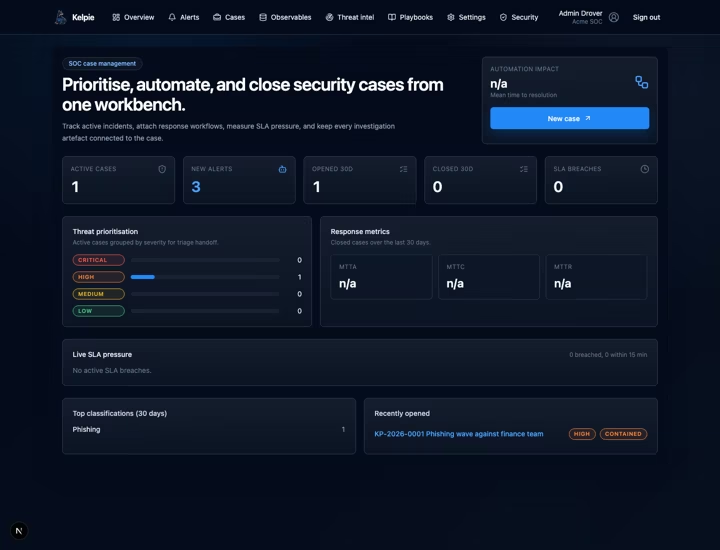
Case operationsQueues, ownership, hand-offs, SLAs, and closure controls.
Investigation & evidenceConnected findings, ATT&CK context, custody, and legal holds.
Human-approved responseGoverned provider actions with separation of duties.
Self-hosted controlRun the platform and keep response data in your environment.
Case operations
Replace the reconstruction work across tickets, chats, spreadsheets, and consoles. Kelpie keeps ownership, queues, decisions, evidence, tasks, controls, and reporting attached to the case from intake through review.
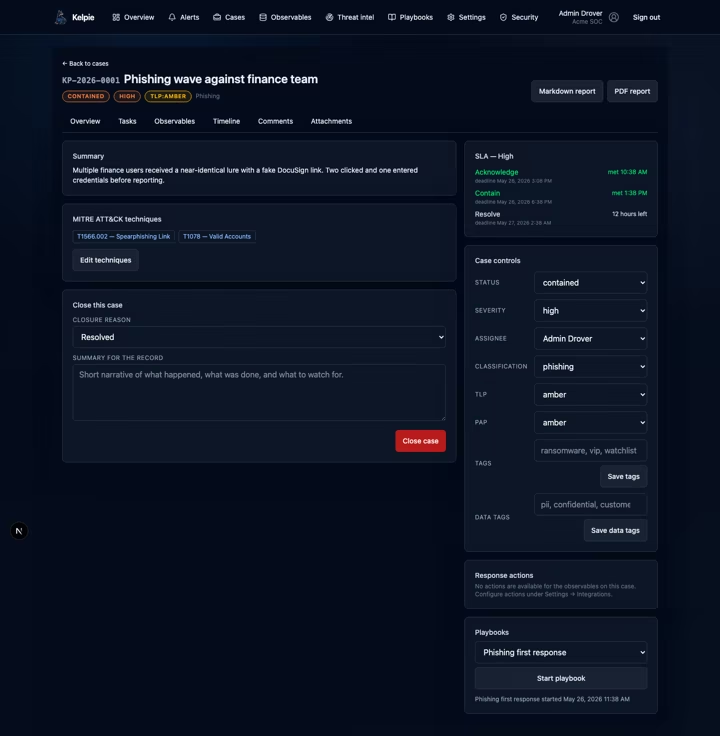
Run each incident through a consistent process while preserving the technical and human decisions that shaped the response.
Investigation workbench
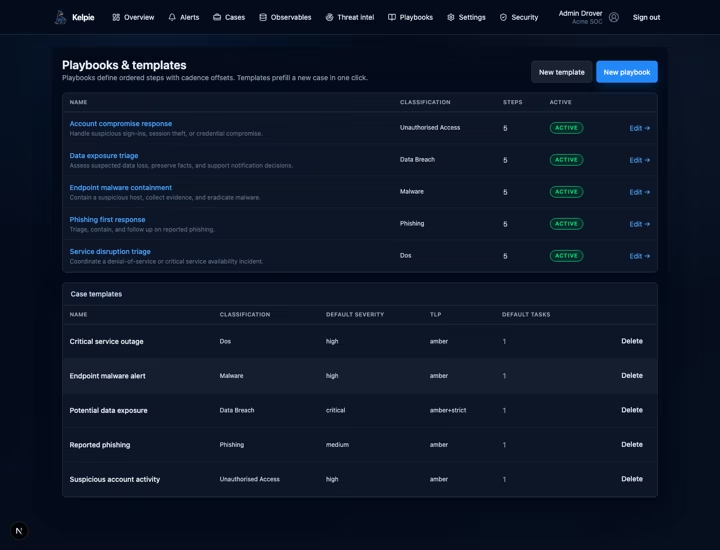
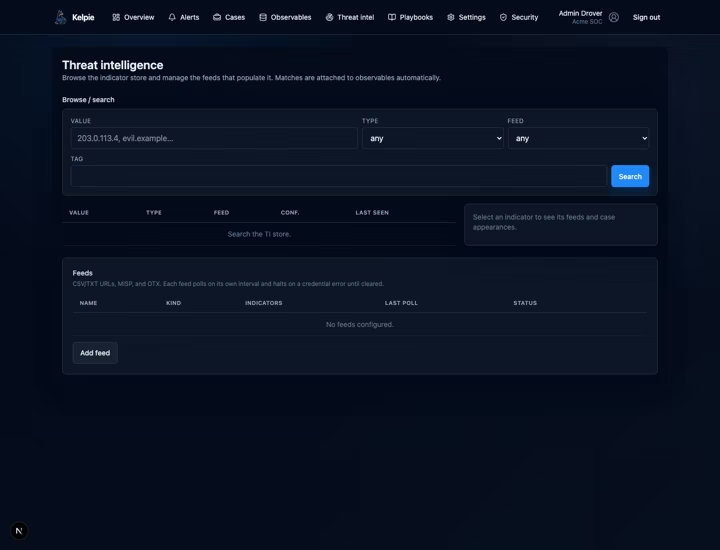
Use a governed playbook catalogue, cross-case observables, local intelligence feeds, investigation graphs, ATT&CK coverage, and evidence controls without moving the incident into a second system.
Product map
Kelpie covers the work around the alert: coordination, investigation, custody, approvals, closure, reporting, and the feedback loop that improves the next response.
Move incidents from open through containment, eradication, recovery, and governed closure. Track severity, classification, TLP, PAP, confidence, command, source identity, affected services, and SLA state.
Manage queues, ownership, escalations, workload, and bulk triage. Use crisis mode for a shared operating picture and structured shift handovers to keep decisions and outstanding work visible.
Connect normalised alerts, entities, observables, evidence, hypotheses, findings, decisions, and case relationships. Correlate, merge, split, and trace an attack story through a typed investigation graph.
Preserve SHA-256 integrity, chain of custody, collections, and legal holds. Scan uploads, quarantine suspicious files, record reasoned overrides, and retain evidence when case records are removed.
Apply timed tasks and 16 baseline SOC scenarios with evidence guidance, decision points, and approval gates. Bind versioned response resources and map phases to your organisation’s incident response framework.
Request indicator blocks, device isolation, antivirus scans, investigation packages, or account disablement and session revocation. High-impact actions require independent approval; asynchronous provider acceptance is not reported as completion.
Bring asset, identity, application, and business-service context into the case. Explain priority using criticality, exposure, privilege, environment, and recovery needs instead of relying on severity alone.
Bring Microsoft, AWS, Cortex XSIAM, Google Security Operations, Splunk, and Elastic Security findings into cases. Enrich observables and connect threat intelligence, current cyber reporting, and watched-vendor context.
Combine single sign-on and directory provisioning with organisation roles, scoped access, need-to-know compartments, and break-glass controls. Export case compliance bundles and organisation data through governed workflows.
Compare historical response trends, review playbook effectiveness, and share operational and executive views. Enforce closure requirements, preserve the final record, and turn post-incident reviews into reusable knowledge.
Review structured triage recommendations before applying fields, tasks, or playbooks. AI starts disabled, with organisation controls for providers, processing regions, sensitive data, and retention. No autonomous containment.
Use local, rules-based guidance for playbook selection, operations, executive briefings, and compliance checklists. The IR mentor cites versioned resources and eligible knowledge; people decide what becomes a task or draft.
Track configurable Australian obligations, deadline warnings, notification records, and approved stakeholder communications. Support human assessments and submissions without claiming legal advice or automatic compliance.
Link risks to cases, record likelihood and impact, and assign owners. Group improvement work into remediation projects with dates, explicit deferrals, and independent verification before closure.
Rehearse ransomware and identity scenarios with clearly marked simulation cases and timeline injects. Keep exercises out of real-incident metrics by default, with no live provider response or regulatory submission.
Give administrators a tenant-scoped view of integration, notification, job, evidence-scan, report, AI-provider, and sign-in failures. Safe diagnostic summaries keep raw payloads and credentials out of the failure stream.
Governed action
Kelpie makes high-impact response explicit. The target is fixed at request time, a second administrator approves it, and the resulting provider action becomes part of the incident record.
Approval requests expire after 15 minutes. Configured Defender reversals require a new, separate approval; other reversals remain recorded manual work. Optional Microsoft incident write-back uses a separately enabled connection.
An analyst selects an action supported by case observables.
A different administrator reviews the immutable target and request.
Kelpie invokes the configured provider and tracks the outcome, including asynchronous runs.
Timeline, run state, retries, and approval evidence stay with the case.
Connected by design
Use configured integrations for intake, identity, enrichment, approved response, and external workflows. Integration health, credentials, diagnostics, schedules, and sync conflicts remain visible to administrators.
Integrations are configured per organisation. Notification controls reduce floods, external work-item links preserve context, and reporting access remains permission-scoped.
Operational loop
Every phase stays visible. Every hand-off and approval stays attached to the record.
Work from saved team views, see ownership and SLA pressure, acknowledge the case, and bring the right responders into the queue.
Correlate alerts and entities, structure findings, map ATT&CK techniques, preserve evidence, and keep analyst decisions attached to the investigation.
Run timed playbooks and bounded automations, or request provider actions that require independent approval before execution.
Meet closure requirements, export the record, track case-linked risks, and independently verify remediation. Rehearse the next response with safely separated tabletop exercises.
Customer-controlled deployment
Host a secure Kelpie instance in your own environment while keeping control of your response data, access, and operations. Connect the tools your team uses within your security boundary.
Book a call to discuss AWS Marketplace procurement and self-managed deployment for your organisation.
Inside your environment
 KelpieYour response workspace
Built and maintained in Canberra
Yuma IT is an Australian Indigenous-led software company based in Watson, ACT, and a Supply Nation Certified Supplier.
Visit Yuma IT ↗

Give your team one place to prioritise the work, govern the response, preserve the evidence, and improve what happens next.